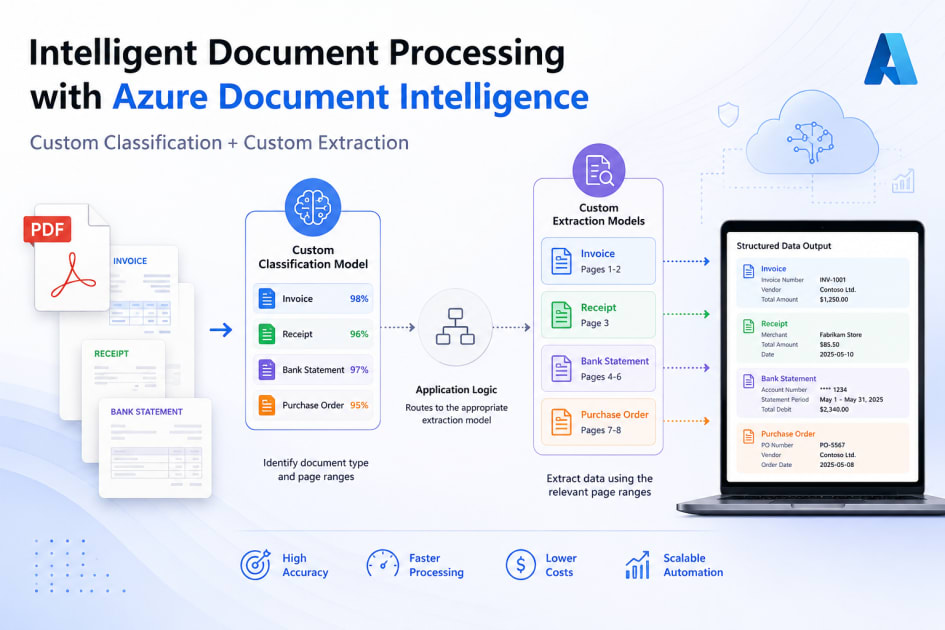
Document processing is a common challenge across industries. Organizations often receive invoices, receipts, bank statements, purchase orders, and other business documents in PDF or image formats. While extracting information from these documents is important, the first step is often determining what type of document is being processed.
Azure Document Intelligence provides two powerful capabilities to address this challenge: Custom Classification Models and Custom Extraction Models. When used together, they enable the development of intelligent and scalable document processing solutions.
Understanding Custom Classification Models
A Custom Classification Model is designed to identify the type of document being analyzed. Rather than extracting information, its purpose is to categorize documents into predefined classes.
For example, a classification model can be trained to recognize:
- Invoices
- Receipts
- Bank Statements
- Purchase Orders
When a document is submitted for analysis, the model returns the detected document type along with confidence scores. This information can then be used by the application to determine the next processing step.
Understanding Custom Extraction Models
A Custom Extraction Model is trained to extract specific fields from a particular document type.
For an invoice, the model might extract:
- Invoice Number
- Vendor Name
- Invoice Date
- Total Amount
For a bank statement, the model might extract:
- Account Number
- Statement Period
- Transaction Details
The extracted data is returned in a structured format, making it easier to integrate with databases, business applications, and automation workflows.
Combining Classification and Extraction
Classification and extraction solve two different problems:
- Classification identifies the document type.
- Extraction retrieves the required information.
A typical workflow may look like this:
Document Upload
       ↓
Custom Classification Model
       ↓
Document Type Identified
       ↓
Application Logic
       ↓
Relevant Custom Extraction Model
       ↓
Structured Data Output
In this architecture, the classification model provides the document type, while the application logic determines which extraction model should be invoked.
Processing Multi-Document PDFs
A common real-world challenge is handling PDFs that contain multiple document types.
For example:
Pages 1-2 → Invoice Page 3 → Receipt Pages 4-6 → Bank Statement Pages 7-8 → Purchase Order
Instead of manually separating these documents, a Custom Classification Model can be trained to identify document boundaries and classify pages within the PDF.
The classification results can provide information about:
Based on these results, the application can invoke the appropriate extraction model for each document segment.
PDF Upload
       ↓
Classification Model
       ↓
Document Types + Page Ranges
       ↓
Application Logic
       ↓
Invoice Extractor (Pages 1-2)
Receipt Extractor (Page 3)
Statement Extractor (Pages 4-6)
Purchase Order Extractor (Pages 7-8)
       ↓
Structured Data Output
An additional advantage is that Azure Document Intelligence supports page selection during analysis. The application can pass only the relevant page range to the extraction model rather than processing the entire PDF.
This approach helps improve extraction accuracy, reduce unnecessary processing, and simplify the handling of complex document batches.
Benefits of Combining Both Models
Using Custom Classification and Custom Extraction Models together provides several advantages:
- Automated document identification
- Improved extraction accuracy
- Efficient processing of mixed-document PDFs
- Reduced manual intervention
- Scalable document automation workflows
- Easier integration with downstream systems
Conclusion
Custom Classification Models and Custom Extraction Models play complementary roles within Azure Document Intelligence.
The Classification Model answers:
“What type of document is this?”
The Extraction Model answers:
“What information should be extracted from this document?”
By combining these capabilities, developers can build intelligent document processing solutions that automatically identify document types, process multi-document PDFs, and extract structured information with minimal manual effort. This approach enables organizations to streamline document-heavy workflows while improving accuracy, scalability, and operational efficiency.